
Overview
This article walks through the two API calls needed to pull a report of who added or changed a user, role, or group in your tenant, and when it happened — using the Security Audit Log API. It includes step-by step instructions for both Postman and curl, plus a link to the full API reference (Swagger).
Problem
You want to identify:
- When a user was created
- When a user’s Roles or Groups were added, removed, or changed; who performed the action, and from what IP address
There is no Console screen for this — it’s retrieved via API.
Prerequisites
- A Reltio user (or client) with the ROLE_ADMIN_CUSTOMER role, which grants the export privilege.(Auth.Audit.Export.Privilege).
- A Reltio Client ID and Client Secret (found in Reltio Console under your application’s OAuth configuration), or a username/password if you’re using the password grant. Postman (recommended) or any REST client capable of making raw HTTP calls (curl, etc.).
Step 1: Obtain an Access Token
Every Reltio API call needs a bearer token first. For
system/integration use (like this), the client credentials grant is the recommended method — it doesn’t require a user login or MFA/OTP step.
Using Postman:
- Open a new request and go to the Authorization tab.
- Set Type to OAuth 2.0, then select Get New Access Token.
- Fill in:
Grant Type: Client Credentials
Access Token URL: https://auth.reltio.com/oauth/token
Client ID: your client ID
Client Secret: your client secret
Client Authentication: Send client credentials in body Scope: leave blank - Select Get New Access Token, then use the token once it’s retrieved.
Using curl:
curl -X POST https://auth.reltio.com/oauth/token \
-H "Authorization: Basic <BASE64_ENCODED_CLIENTID:CLIENTSECRET>"
-H "Content-Type: application/x-www-form-urlencoded"
-d "grant_type=client_credentials"
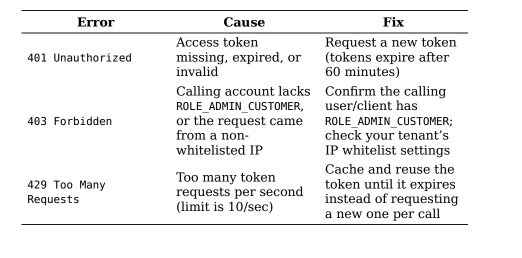
The response includes an access_token (valid for 60 minutes) — use it as a Bearer token in Step 2.
Note: The token endpoint itself is not tenant-specific and isn’t subject to IP whitelisting. However, once you use that token to call a tenant-scoped API (including the audit export below), the request does need to come from a whitelisted IP if your tenant has that enabled, or it will fail with a 403 Forbidden.
Step 2: Export the Security Audit Log
Call the audit export endpoint, filtering for the event types you care about (user, role, and group changes).
Request:
POST https://auth.reltio.com/audit/export
Authorization: Bearer <accessToken>
Content-Type: application/json
{
"customerId": "<yourCustomerId>",
"startTimestamp": 1693738800,
"start": "2026-09-01T00:00:00Z",
"endTimestamp": 1693766400,
"end": "2026-09-01T23:59:00Z",
"usernames": [],
"events": [
"USER_CREATED",
"USER_MODIFIED",
"USER_DELETED",
"USER_LOCKED",
"USER_UNLOCKED",
"ROLE_CREATED",
"ROLE_MODIFIED",
"ROLE_DELETED",
"GROUP_CREATED",
"GROUP_MODIFIED",
"GROUP_DELETED"
],
"format": "JSON"
} customerId — your Reltio customer ID (not the individual tenant ID).
start/end — the report can cover up to a 24-hour window per request. For a longer lookback, run this call repeatedly across sequential 24-hour windows and combine the results. usernames — optional; leave as an empty array to include all users, or list specific usernames to narrow the report.
format — JSON or CSV.
Response (example, JSON):
[
{
"timestamp": "2026-09-01T11:17:13.995Z",
"ipAddress": ["10.0.0.1"],
"userName": "admin.user@company.com",
"eventName": "USER_CREATED",
"eventObject": "new.user@company.com",
"eventDetail": [
{ "firstName": "Jane", "lastName": "Doe", "email":
"new.user@company.com" }
]
},
{
"timestamp": "2026-09-01T11:20:02.500Z",
"ipAddress": ["10.0.0.1"],
"userName": "admin.user@company.com",
"eventName": "GROUP_MODIFIED",
"eventObject": "testGroup",
"eventDetail": [
{ "groupId": "testGroup", "roles": { "ROLE_WORKFLOW_ADMIN": ["EQ0L0f"] } }
]
}
]
Each row tells you: who did it (userName), what they changed (eventName / eventObject), the full before/after object definition (eventDetail), and when and from where (timestamp, ipAddress).
Step 3: Building a “Before and After” View
Reltio doesn’t provide a UI timeline of role/group history, but you can reconstruct one from the export:
- Pull the audit export across the time range you want to review (chaining multiple 24-hour windows as needed).
- Filter to ROLE_MODIFIED / GROUP_MODIFIED / USER_MODIFIED events for the user, role, or group in question.
- Sort the matching events chronologically and compare each eventDetail payload to the one before it — the difference between two consecutive JSON definitions is exactly what changed at that point in time.
Common Errors
Full API Reference
The complete request/response schema for both APIs used above is
available in the Reltio Developer Portal:
Security Audit Log API - https://developer.reltio.com/private/swagger.htm?module=Tenant%20Management#/Security%20Audit%20log
General API syntax lookup - https://developer.reltio.com/
Related Documentation
Security Audit Log API overview
Export security audit log reports (full spec)
Obtaining access tokens with client credentials grant type
ROLE_ADMIN_CUSTOMER Access permissions
API Token and Tenant IP Whitelist restrictions
Comments
Please sign in to leave a comment.