
Question
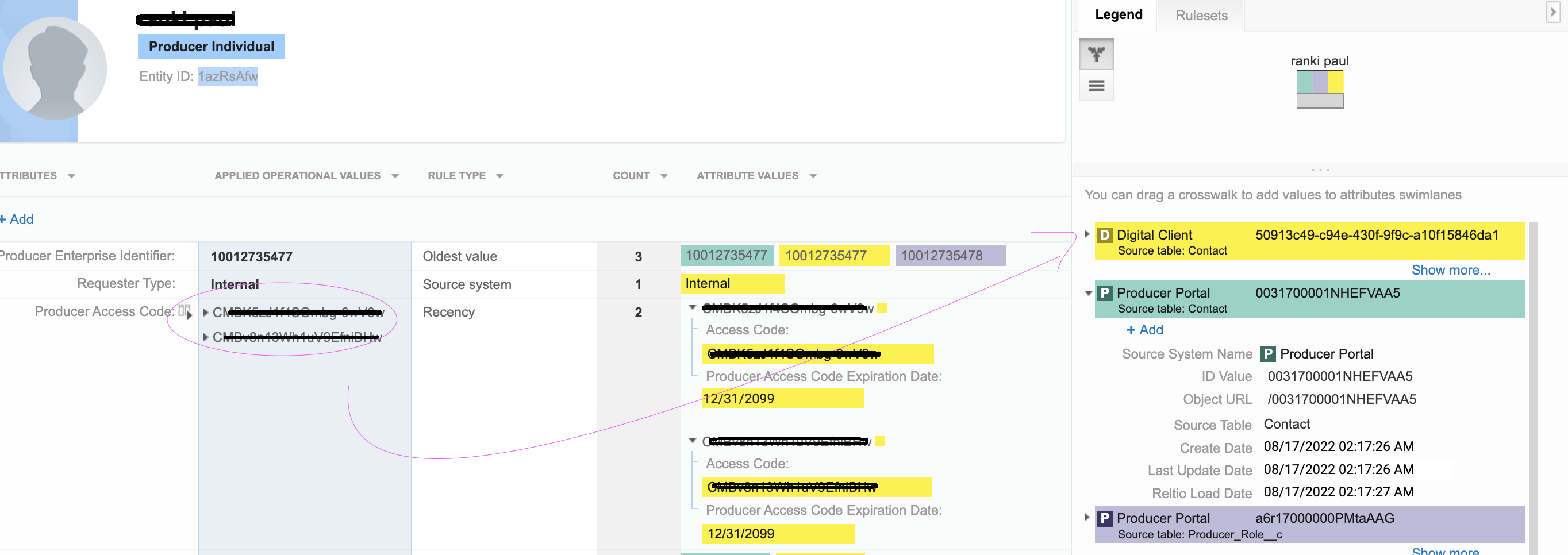
We observed that the recency rule for the "access code" attribute is not working as expected only in the Test tenant.
Example:
We always send the latest payload with the latest access code as below but all the old values are not overwritten even if we send updates from the same source system.
The tenant configuration is the same in the dev and test environment.
Below is the endpoint and payload we are using to update the access code, we always update the access code field and will not retain old access code values.
POST {{RELTIO__URL}}/entities?options=partialOverride
[
  {
    "type": "configuration/entityTypes/Contact",
    "attributes": {
      "ProducerAccessCode": [
        {
          "value": {
            "AccessCode": [
{                 "value": "CMBe-h9r0djsTbVqa47vw"               }
            ],
            "ProducerAccessCodeExpirationDate": [
{                 "value": "2099-12-31"               }
            ]
          }
        }
      ],
      "SyncToSalesforce": [
{           "value": "true"         }
      ]
    },
    "crosswalks": [
{       "type": "configuration/sources/DigitalClient",
        "sourceTable": "Contact",
        "value": "57fdf8a7- -5c4c-4c4e-9cca-ca4d35805118"       }
    ]
  }
]
Answer
- Rather than executing the API using
POST {{RELTIO__URL}}/entities?options=partialOverride
Change to
POST {{tenantURL}}/entities?options=partialoverride,updateAttributeUpdateDates
- When both the
partialOverrideandupdateAttributeUpdateDatesoptions are used in the request query:- If the
updateDatespecified in the request is earlier than the currentupdateDate, then the values ofupdateDateandsingleAttributeUpdateDatesattributes do not change in the response. - If the
updateDatespecified in the request is later than or the same as the currentupdateDatevalue, then theupdateDatevalue does not change in the response butsingleAttributeUpdateDatesvalues for all attributes specified in the request body change to theupdateDatevalue specified in the request.
- If the
updateAttributeUpdateDates Option - You can store update dates for each attribute. This information can be found in singleAttributeUpdateDates property of crosswalks. By default, Reltio Cloud does not save this information for an entity overwrite and assumes that update dates of all attributes are equal to the latest update date of the crosswalks to which attributes are related. The updateAttributeUpdateDatesoption changes this behavior. If this option is present, then singleAttributeUpdateDates property of crosswalks will be updated for changed and new attributes.
- Make sure that you are using advanced survivorship as defined below.
"survivorshipAdvancedBehavior": [
        "LUD"
    ],
Reference
- https://docs.reltio.com/infoandconfig/updateattributes.html
- https://support.reltio.com/hc/en-us/articles/360035506051-What-are-the-best-practices-for-creating-and-updating-entities-
Comments
Please sign in to leave a comment.